

DeltaXignia Capabilities
Capabilities That Drive Precision and Performance
Explore the full range of capabilities that power DeltaXignia’s intelligent change management solutions. From precision change detection and multi-version merging to automated validation and scalable performance, our solutions are built to handle the complexity, scale, and flexibility today’s enterprise workflows demand.
Different Capabilities, Different Roles
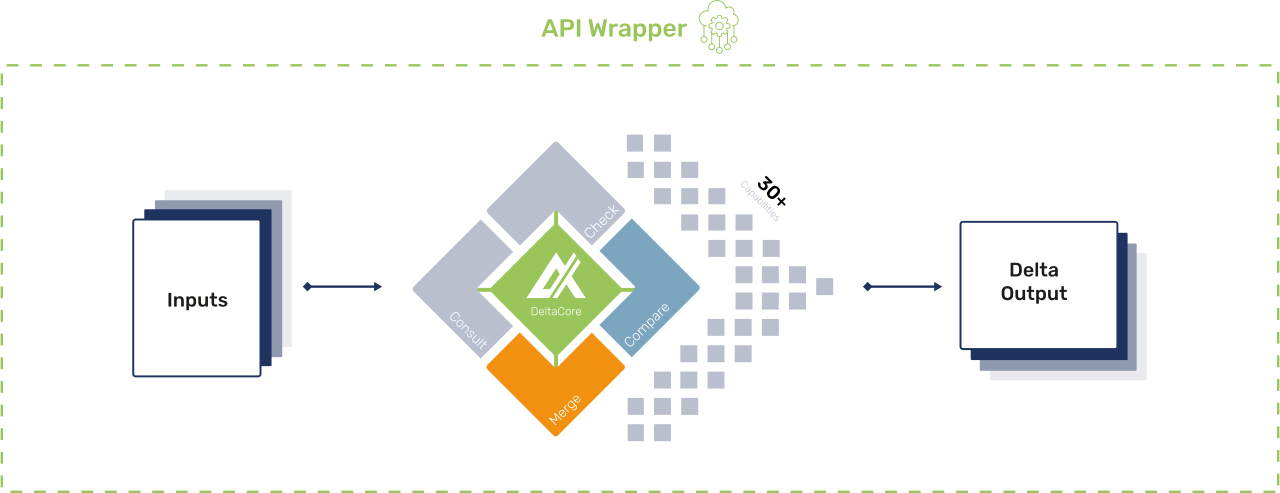
DeltaCore, Compare, Merge and the DeltaOutput each focus on a specific part of the change management journey. Together, they form a complete solution: detecting and understanding changes, reconciling multiple inputs, powering enterprise-scale processing, and providing the flexible outputs needed to integrate seamlessly into your workflows.
i
i
i
i
i
Accuracy. Automation. Performance.
The foundation of every DeltaXignia solution, designed to cut risk, save time, and scale with your business.
Change Detection Without Compromise
Catch every change that matters, from character-level edits to large structural shifts. DeltaXignia ensures precision in even the most complex documents and data sets, so teams can trust the integrity of every version.
✓ Detect changes in text, structure, attributes, and formatting.
✓ Eliminate false positives with contextual rules and filters.
Smarter Workflows, Less Effort
Replace repetitive manual checks with automated processes that scale. Built-in rules and configurable pipelines streamline reviews, reduce risk, and free up time for higher-value work.
✓ Automate comparisons, merges, and validations across projects.
✓ Integrate seamlessly with existing content and data management systems.
Scalable by Design
Handle the largest files, highest volumes, and most demanding workflows without compromise. DeltaXignia adapts to your environment, keeping processes fast, reliable, and enterprise-ready.
✓ Optimised for high performance and large-scale workloads.
✓ Flexible outputs and APIs tailored to your systems and audiences.
Unmatched Accuracy at Every Level
Catch every change, from character-level edits to structural shifts, with powerful detection designed for complex content.
Full Scope Change Detection
Tracks changes in metadata, formatting, and embedded elements like images and charts for a complete review.
Grammar-Specific Processing
Accurately compare content while respecting the grammar rules of markup languages such as DITA and DocBook.
Diagram Comparison
Specialised comparison for SVGs, allowing users to spot changes within diagrams and illustrations.
Image Comparison
Highlight visual changes across photos and graphics, supporting both JPEG and PNG formats.
MathML Comparison
Precisely compare equations and scientific content with MathML-aware comparison.
Move Tracking & Tagging
Identify and label moved content accurately, avoiding false insert/delete flags and giving reviewers clear context.
Comprehensive Change Tracking
Capture every type of change across structure, text, and formatting for a full, reliable comparison.
Word-Level Change Detection
Track changes at the word level to highlight meaningful content updates.
Character-Level Change Detection
Capture every type of change across structure, text, and formatting for a full, reliable comparison.
Automation & Workflow Efficiency
Automate your comparison and merge processes with intelligent rules and processing pipelines, built to reduce manual effort and risk.
Integration-Friendly API
Easily embed into your systems with a flexible, developer-friendly API that fits into your current tech stack.
Customisable Comparison Rules
Tailor the comparison process to suit your specific requirements with flexible rule configuration.
Intelligent Matching Algorithms
Uses advanced matching algorithms to accurately pair corresponding elements, even when structures have shifted.
Merge Functionality
Confidently merge two or more documents or datasets while preserving structure and content integrity.
Change Conflict Management
Apply rules to handle conflicts intelligently, ensuring the most accurate and logical outcome in your merges.
Sequential and Concurrent Merging
Merge documents in sequence or all at once, depending on your workflow needs and level of control required.
Customisable Merge Rules
Define how changes are merged based on content type, structure, or business logic, giving you full control.
Collaborate with Multiple Editors and Reviewers
Track contributions from different authors to streamline team-based editing and review.
Automated Conflict Detection
Quickly identify conflicting changes between versions without relying on time-consuming manual review.
Process Automation
Streamline repetitive tasks and reduce manual effort by automating your comparison and merge workflows.
Performance, Flexibility, and Scale Built In
Handle large files, high-volume processes, and diverse output needs with a solution designed for speed, adaptability, and precision.
High Performance and Scalability
Handle large files and high-volume processing with ease, thanks to an engine designed for enterprise-scale workloads.
Performance Optimisation
Fine-tune processing speed and resource usage with configuration options tailored to your environment.
Flexible Output Processor
Customise how results are generated, transforming raw comparisons into the format your systems or users need.
Visual Change Markup
See changes highlighted directly in the content, making it easy to spot edits, insertions, and deletions at a glance.
Flexible Output Formats
Export results as structured XML, HTML, deltas, or custom formats to suit your workflow or audience.
Table Comparison
Detect changes within structured tables, including rows, columns, and cell-level edits, for precision at scale.
Ignore Changes
Filter out specific types of changes, such as formatting or metadata, to reduce noise in your results.
Ignore Structure
Focus on content changes by temporarily disregarding structural differences where they’re irrelevant to the task.
Merged Output Flexibility
Produce clean, unified output from merged documents, with control over what changes are shown and how they’re represented.
Unordered Content & Data Handling
Accurately compare and merge unordered data sets where sequence doesn’t matter, such as lists or records.
Table Merging
Merge tabular content intelligently, preserving structure and ensuring data accuracy across rows and columns.
Whitespace Handling
Customise how whitespace is treated in comparisons to avoid false positives and focus only on meaningful changes.
Trusted Change Management for Every Workflow
Whether you need to compare, merge, validate, or integrate, DeltaXignia provides the building blocks for trusted content and data management.

Compare
Precise Document & Data Comparison
Identify, review, and share every change between two or more document versions.
✓ Highlight additions, deletions, and modifications with accuracy.
✓ Produce redlined outputs for editors or downstream systems.
✓ Integrate with content management pipelines and other systems of record.

Merge
Smart Merging for Complex Documents
Bring multiple edits or branches together into one accurate, conflict-free document.
✓ Merge 3+ versions into one trusted output ready for use.
✓ Auto-resolve conflicts with rules you control.
✓ Keep every valid change without breaking structure.

Check
Independent Conversion Validation
Ensure every conversion or migration is accurate with clear, actionable reports.
✓ Detect changes between source and converted files.
✓ Generate clear, actionable HTML reports for quick sign-off.
✓ Works with Word, XML, HTML, DITA, DocBook and more.

Consult
Expert Setup & Optimisation
Get tailored help to plan, configure, and fine-tune DeltaXignia solutions.
✓ Design and set up tailored pipelines.
✓ Optimise how Check, Compare, and Merge fit into your processes.
✓ Fine-tune your setup for faster, more reliable results at scale.
Frequently Asked Questions
What’s the difference between DeltaXignia’s solutions and capabilities?
DeltaXignia’s Compare, Merge, and Check are independent solutions designed for specific functions: detecting changes, merging versions, or validating accuracy. Each solution is powered by a set of underlying capabilities, with Core and DeltaOutput providing the shared performance and output foundation across all of them.
Can I use multiple solutions together?
Yes. While each solution works independently, many organisations choose to combine them. For example, Compare and Merge can be used together to manage multi-version authoring, while Check provides validation and assurance before release.
What roles do Core and DeltaOutput play?
Core delivers the high-performance processing engine behind every solution, while DeltaOutput provides the flexible, structured output that can be transformed into any format, such as reports, redlines, or data feeds.
Are the capabilities the same across all solutions?
Some capabilities, like Ignore Changes, Adaptive Processing Pipelines, and Unordered Content & Data Handling, appear across multiple solutions, while others are unique to a specific function. For instance, Conflict Management supports merging, whereas Side-by-Side View is unique to Compare.
How do I know which solution I need?
Our team will guide you to the right solution for your workflow, but here’s a quick view of what we’d usually recommend:↠ Detecting and reviewing changes? We’ll start you with Compare.↠ Bringing versions together cleanly? We’ll set you up with Merge.↠ Verifying accuracy after a transformation or migration? We’ll point you to Check.Book a discovery call with us to talk through what you’re trying to achieve. We’ll help you pinpoint the best fit, then walk you through it in a tailored demo.