Our Solution
Our Solution
DeltaNova
By Business Case

Version Control & Collaboration

Data Consistency & Management

AI & Automation
By Industry

Aviation

Manufacturing

Legal

Financial Services

Life Sciences
Our Solution
DeltaNova
By Business Case
Version Control & Collaboration
Data Consistency & Management
AI & Automation
By Industry
Aviation
Manufacturing
Legal
Financial Services
Life Sciences

Last updated: 11 December 2025
For many technical documentation teams, the way they review content today feels steady and familiar. Editors and reviewers know their tools, know where everything lives, and understand the slower, hands-on process they’ve relied on for years. Whether they’re working on semiconductor specs, aviation manuals or legal material, there’s a sense of reassurance that comes from checking each change with their own eyes.
Most teams also lean on the methods that have served them well for a long time, long email chains to share drafts, spreadsheets to track who’s reviewing what, and the simple built-in comparison features that come with common editing tools. These approaches may not be perfect, but they’re known. They fit neatly into existing habits and give people a sense of control.
But this confidence comes with a cost. Manual reviews pull in time and attention before any meaningful feedback even begins. Hours are lost to slow comparisons, especially when documents blend dense text with structured data that’s easy to miss at a glance. On the surface it feels manageable, but behind the scenes it’s demanding and often far slower than expected.
The Read Me First method , developed by Sun Microsystems, provides one of the most realistic views of how long technical documentation actually takes. Instead of focusing only on writing time, it breaks the process into key activities and shows that reviewing is often the biggest time sink. According to this method, writing a single page can take 3–5 hours, but reviewing it can take 1–3 hours on its own, especially when multiple stakeholders are involved. Editing is far lighter at around 0.2 hours per page, while indexing is one of the biggest activities at roughly 5 hours per page. When you add production time (about 5% of the project) and project management (10–15%), it becomes clear why documentation cycles stretch far beyond what writing alone would suggest.
These long review cycles were manageable when documents were smaller and updates were infrequent, but that world has changed. Modern documentation now moves at a pace and scale that manual review simply wasn’t designed to handle. Today’s documents are larger, updated more often, created by multiple contributors, and packed with structured data, metadata, images, diagrams, conditional variants and regulatory detail, a far cry from the simple, text-heavy files traditional tools were built for.

The steady, familiar way of working begins to strain as modern documentation demands far more from every team. What used to be manageable now arrives in larger volumes, with tighter deadlines and greater complexity. Technical manuals grow, regulations change more often, and product teams release updates at a far quicker pace. Documentation teams are expected to keep up, but the tools and methods they’ve relied on can’t move with the same speed.
Many documentation teams rely on familiar tools such as Microsoft Word’s Track Changes , spreadsheets for review tracking, and long email threads for version management. On the surface, these tools feel sufficient, they’re available, everyone knows how to use them, and they fit into the existing workflow. For example, Word’s Track Changes feature allows editors to see who made what change and when. But when documents become large, highly structured, or require complex version control, these tools begin to run into serious issues.
As manuals grow into hundreds of pages and start mixing structured data, technical diagrams, metadata and contributions from multiple authors, the usual tools, things like Word’s Track Changes, built-in comparison features, email chains and spreadsheet-based review trackers, begin to struggle.
Built-in comparison features are designed for simple text, not the layered content found in technical documentation. Many documents include tables, XML sections, metadata, diagrams or CAD-based images, and standard comparison tools often fail to track changes inside these elements. They can:
When these tools miss key changes, reviewers have to check everything manually just to be safe, slowing the review cycle and increasing the chance of oversight.
Other common tools add their own problems:
In short, the tools that feel fine for small updates start to behave unpredictably as complexity and volume increase, creating delays, confusion and more manual work at the worst possible time.
Version control and document tracking are critical in regulated industries, can cause things to fall apart quickly. Updates get missed, work is repeated and people use the wrong information, leading to errors, compliance issues and a loss of trust. The typical workflow that relies on manual methods or basic built-in tools simply doesn’t offer the audit-trail, merge-capability or structured change-tracking required for large technical documentation.
What this means in practice is: reviewers spend more time sifting through documents to find changes, editors carry the burden of reconciling multiple versions, and managers handle more queries about “which version is correct”. The process becomes slower, more error-prone and less predictable. The tools that once seemed dependable now add friction rather than reduce it.

By this point, it’s clear how the traditional review process begins to fall apart. What once felt steady and manageable becomes slower and harder to control as documents grow in size, structure and frequency of updates. Hours are lost to manual comparisons, long email chains and clunky spreadsheets, and even simple revisions trigger lengthy rounds of checking. Reviewers spend more time trying to understand what changed than actually assessing the content.
The tools teams rely on, Track Changes, built-in comparison features, shared spreadsheets, simply can’t keep up. Large files become sluggish, structured data and metadata go unnoticed, and inconsistent drafts spread through inboxes. When important edits slip through or multiple versions circulate at once, people have to start over, repeating work just to make sure nothing’s been missed.
As these delays build, the pressure spreads across the team. Editors spend more time reconciling feedback, reviewers become bottlenecks and compliance teams receive documents later than they need. Workflows stretch, confidence drops and the entire process becomes reactive instead of deliberate.
None of this is caused by the people involved, it’s the process itself. Manual checks, slow tools and basic comparison methods were never designed for the pace and complexity of modern documentation. When documents grow, regulations tighten and updates arrive faster, the old approach simply can’t keep up. The workflow that once supported teams now holds them back.
When the pressure reaches its peak, adding more people or extending deadlines only masks the problem. The real shift comes from redesigning the process , so the repetitive, time-consuming work isn’t handled manually at all. Automation steps in here, not to replace skilled reviewers, but to carry the load that slows everything down. And at the centre of these automated workflows sits the most important part: a comparison engine teams can trust completely.
Automated workflows only work if the comparison at their core is accurate. That’s why solutions like DeltaCompare play such a key role. By delivering a 100% accurate, structured comparison, DeltaCompare gives every reviewer the same clean, reliable view of what has changed. No missed edits. No half-detected updates. No uncertainty. With this foundation in place, reviewing becomes a focused task rather than a hunt for differences.
Once comparison happens automatically, the rest of the process becomes far easier to streamline. A new version can be picked up the moment it enters a system, compared against the previous one and changes routed directly to the right reviewer, all without manual touchpoints. Automation handles the triggers, the handovers and the checks, so the cycle keeps moving without the delays caused by email chasing or spreadsheet updates.
Automation isn’t a one-size-fits-all setup. With a reliable comparison engine at the centre, workflows can be shaped around the needs of different teams and industries:
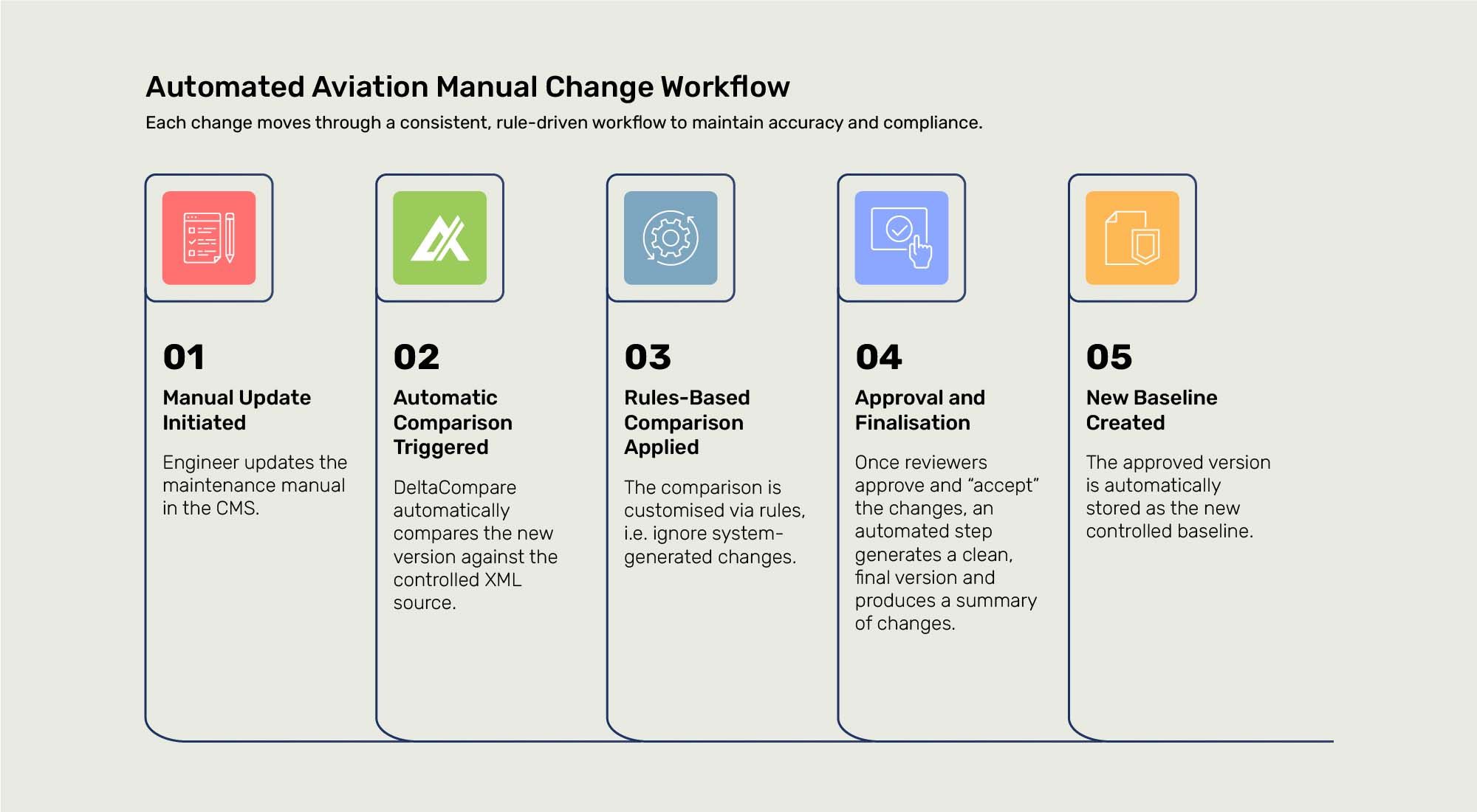
Aviation documentation is highly regulated, making accuracy and traceability critical. With a comparison engine like DeltaCompare at the core, the entire workflow can be automated end-to-end:
Semiconductor documentation is complex, often mixing narrative content with intricate, structured data such as tables, registers, pin definitions and parameter sets. Automation can manage both at once:
This ensures accuracy across product variants without requiring engineers to manually cross-check hundreds of pages.
Legal documents involve many contributors and often tight deadlines. Automation removes the chaos:
This cuts days of back-and-forth and removes the risk of misplaced edits.
Software teams often update user guides, release notes and API references at speed. Automation supports rapid, reliable updates:
This keeps documentation aligned with fast product cycles without slowing teams down.
With automated summaries, structured validation and clear change views, reviewers can trust the material they receive. Compliance teams gain certainty, editors get clarity and stakeholders see only what matters. Instead of reacting to problems late in the process, teams make better decisions earlier and more consistently.
This isn’t a small efficiency tweak, it’s a move to a more stable, predictable way of working. When DeltaCompare anchors the comparison stage, automation can manage the background tasks that used to drain time and attention. The result is a workflow built for the scale, pace and complexity of modern documentation.

Once automation sits at the centre of the review process, with a comparison engine delivering accurate change data every time, the entire cycle becomes more consistent. For example, in the aviation sector SunExpress achieved a ~90% reduction in man-hours spent just demonstrating changes, and an 80% faster review cycle after deploying a tailored comparison workflow. Reviewers receive clear, dependable outputs at the right moment: updates are compared instantly, tasks are automatically routed, and everyone sees the right changes, not a cluttered file or half-complete mark-up.
One of the immediate benefits becomes speed. Reviews that once took days or weeks can move through far faster, because the manual work of spotting changes has already been handled. For instance, in manufacturing and engineering documentation, Semcon reported up to 50% savings in time required for validation of revised documents after implementing structured-document comparison. Large manuals, structured datasets and mixed content formats, previously major pain points, are handled automatically. The result: speed becomes a natural outcome, not something that compromises quality.
As documents grow in size and complexity, the automated workflow absorbs the pressure instead of passing it on to the team. In publishing, for example, Wrycan reduced labour for redline production of standards by 98.5% (from 70 hours down to under one hour) using fully automated redline workflows. Whether it’s aviation manuals, engineering specs, legal contracts or software release notes, each workflow adapts to the team’s needs without generating extra manual workload.
When every change is captured and clearly shown, reviewers gain confidence that nothing’s been missed. Compliance teams receive accurate, auditable outputs. Customers experience better-quality updates delivered sooner, for example, airline maintenance teams receive highlighted manual revisions faster, engineering teams get specs aligned with product variants sooner, legal clients access clean redlines without email chaos. The benefits trace back to internal efficiency and forward to customer trust.
If your team is dealing with slow reviews, repeated approval loops, or the challenge of managing large or complex documents, it may be time to look at how automation can support your process. Whether you're working with technical manuals, legal updates, engineering specs or anything in between, the right solutions can remove the heavy lifting and give your reviewers the clarity they need. If you’d like to explore how this could work in your own workflow, we’re always happy to talk .

From ISO Quality Services Ltd.


